
This article contains the following sections:
- What is the OpenSearch integration?
- Why OpenSearch
- OpenSearch authentication
- Integration scenarios
- Configuration
- Troubleshooting
What is the OpenSearch integration?
OpenSearch is an industry standard protocol for making systems searchable. In short, OpenSearch is an RSS feed where the results are filtered by search terms. Additionally, the RSS feed ideally also provides pagination for the search results. If another system in your organisation uses this open standard, you can search in these other systems (Enterprise Search) via Embrace using OpenSearch.
Basically, these are also the requirements that Embrace sets for OpenSearch:
- RSS feed filtered by search terms
- results in RSS2.0 / RSS 1.0 / ATOM format (required)
- support for pagination (optional, it is also possible that the feed always delivers max 100 items and Embrace handles the pagination)
At this moment, Embrace can only query other OpenSearch sources and cannot serve as a source itself.
More information:
- http://docs.oasis-open.org/search-ws/v1.0/opensearch-v1.0.html
- https://en.wikipedia.org/wiki/OpenSearch
- https://github.com/dewitt/opensearch/blob/master/opensearch-1-1-draft-6.md
Why OpenSearch
We regularly receive requests from customers to be able to search in another system via Embrace. Until now, this always meant that an Embrace developer had to write C# code based on the API of the respective system. This is not a very flexible solution. Therefore, a solution was sought where any developer can develop something in any programming language. This is also the starting point of OpenSearch support by Embrace.
Not Plug and Play
OpenSearch integration is usually not simple Plug and Play. It requires quite a lot of technical knowledge and probably also support from a developer. And there is a good chance that a developer will have to write software for this.
Out of scope
OpenSearch provides a simple standard for basic search queries. Therefore, the following will not work:
- The date filter of Embrace is not passed on to OpenSearch.
- Advanced search is not well supported in OpenSearch. Only the fields "All these words", "exact phrase" and "any of these words" are sent. But the receiver cannot distinguish between these and will only be able to perform a standard search query based on these words.
OpenSearch authentication
The OpenSearch specification defines the protocol for searching and search results. But it does not specify anything about authentication. To avoid having to build very extensive authentication mechanisms in Embrace and because each system might have a different mechanism, simple support for the Authorization HTTP header has been built in. When configuring OpenSearch, the raw value of this header can be specified.
This allows supporting authentication scenarios such as:
- Anonymous authentication (leave Authorization configuration empty)
- Basic authentication
- (OAuth) Tokens authentication
- API key authentication
- etc
Warning: Use these authentication methods only via https!
Embrace therefore only works with predefined authentication credentials (system accounts) and not with personal credentials. However, Embrace can send an HTTP header with each request on behalf of the user executing that request. The OpenSearch source can use this to impersonate that person and/or filter search results so that the user only sees what they have access to.
The HTTP header "Impersonate-User" then contains the UserPrincipalName of the user.
Note: This is only sent if it is known in Embrace. For this, a profile synchronization such as push sync is required.
Basic authentication
In basic authentication, the username and password are separated by a colon and Base64 encoded, sent after the word Basic. For example, if the username is demo and the password is Password1, it becomes:
Basic ZGVtbzpQYXNzd29yZDE=
(OAuth) Tokens authentication
For OAuth tokens or Bearer tokens, a token is specified after the word Bearer, for example:
Bearer eyJhbGciOiJIUzI1NiIsInR5cCI6IkpXVCJ9.eyJzdWIiOiIxMjM0NTY3ODkwIiwibmFtZSI6Ikp vaG4gRG9lIiwiaWF0IjoxNTE2MjM5MDIyfQ.SflKxwRJSMeKKF2QT4fwpMeJf36POk6yJV_adQssw5c
OAuth access tokens are often valid for 1 hour. However, ensure that in this case this token has a long validity period.
API key authentication
Custom API key authentication is somewhat similar to the previous authentication mechanisms. For example:
- ApiKey: klscwdemweodwoicjiowjndfoiwmnfoiwer
- klscwdemweodwoicjiowjndfoiwmnfoiwer
- Key: klscwdemweodwoicjiowjndfoiwmnfoiwer
Integration scenarios
-
Out of the box
If the system to be searched supports OpenSearch in the form required by Embrace and if the system can handle one of the authentication methods, it can be connected quite easily and without customisation.
-
Customisation - extension of the system (the OpenSearch source)
If the system to be searched does not support OpenSearch or cannot handle the Embrace authentication method, the supplier of this system may consider building or adapting this.
-
Customisation - adapter
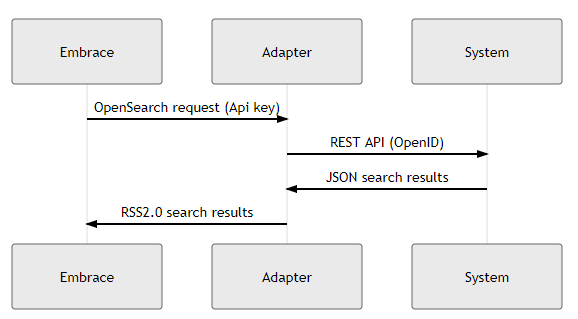
If the system to be searched does not support OpenSearch or cannot handle the Embrace authentication method, a piece of software can be written that is placed between Embrace and the system. This software can convert the OpenSearch request and/or authentication from Embrace to a specific authentication and (REST) API of the system. And convert the search results back into OpenSearch format. This software can be made in any programming language and by any developer.
Configuration
In Embrace environment management, one or more OpenSearch sources can be specified. 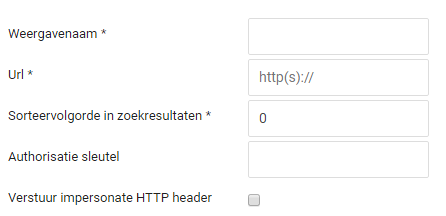
For each source, the following must be specified:
-
Display name
Name of the source as it will be displayed in the search results.
-
URL
URL of the source. This URL must be correctly encoded and contain at least a placeholder {searchTerms} for the search words. Additionally, the URL can have placeholders for pagination. These are {count} for the number of items per page, {startPage} for the current page requested (page mode) or {startIndex} for the first item to be retrieved (stream mode). These placeholders are according to the specification at http://docs.oasis-open.org/search-ws/v1.0/opensearch-v1.0.html. For example: https://www.nature.com/opensearch/request?interface=opensearch&query={searchTerms}&httpAccept=application%2Frss%2Bxml&maximumRecords={count}&startRecord={startIndex}
-
Sort order
A number between 0 and +/- 1000 indicating the position in the search results (experiment with this for the right position)
-
Authorization key
See previous paragraphs about authorization.
-
Send impersonate header
Whether the UserPrincipalName of the current user should be sent with the request.
Troubleshooting
If things do not function correctly, it may help to send requests to the OpenSearch source with a REST client such as Insomnia or Postman to check the operation.
Open Search is available from version R36.